AI TOOL / #01242
Photo Stitching (PixPix)
Combine multiple images into a long image grid
Introduction
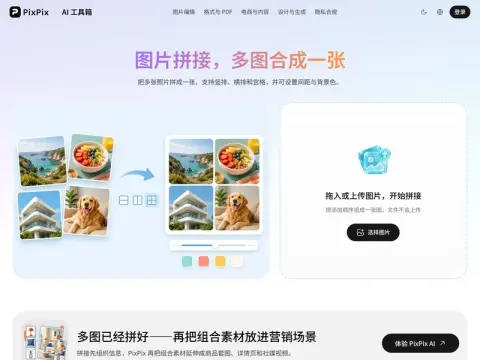
Combine multiple images into one and output it as a JPG, with three layout options:
- Vertical typesetting— Read the long image and tutorial from top to bottom.
- Horizontal typesetting— Before-and-after comparison, with A/B options presented side by side
- grid—— When displaying multiple similar photos, they look neatest when they are all the same size.
Setting the spacing to 0 creates a seamless stitch, which works well for joining long screenshots together; increasing the spacing makes each image stand on its own. Both the gaps and blank areas are filled with the background color, and these two settings largely determine whether the finished result looks like a polished piece or a casual mashup.
If the photo sizes don’t match, the grid will leave gaps that are filled with the background color. For the neatest result, first crop the photos to the same aspect ratio before stitching them together.
Related
Lutra AI
AI assistant for data enrichment, research, and workflow automation.
AI21 Maestro
AI21 Labs offers AI solutions for complex tasks, document analysis, and workflow automation, with usage-based pricing.
Coder
A self-managed cloud development environment designed for developers and artificial intelligence programming proxy services.
Gupshup
A conversational interactive platform that connects enterprises and customers through multiple channels.
KaneAI
A unified testing cloud for cross-browser, automated, and real device testing, with AI insights.
ClarityAI
An AI-based tool for image enlargement and enhancement, featuring high-resolution output and detailed detail restoration.