AI TOOL / #02062
Octo
An AI-driven analysis tool designed for Google Sheets, which utilizes natural language processing.
Introduction
AI-powered analytics tool for Google Sheets using natural language.
What is the Octo AI Chrome extension/plug-in?
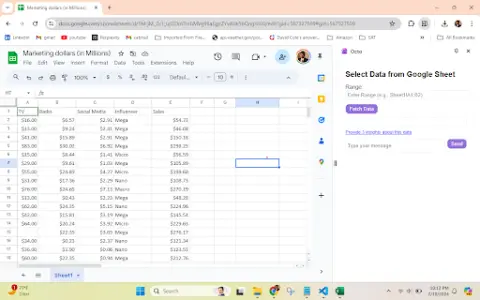
Octo is an AI-powered analysis tool designed to simplify data analysis within Google Sheets. It enables users to analyze data using natural language processing, providing immediate insights right within the Google Sheets interface without the need to leave that environment. Octo supports a wide range of data types, including marketing, product, and financial information, making data analysis more convenient and efficient.
How to use the Octo AI Chrome extension/plug-in?
1. Enter the data range for the table in the format specified in the example (for instance, copy the range from the inserted pivot table).
2. Click “Retrieve Data”.
3. Begin asking questions to analyze the data (for example, “What are the key insights that can be derived from this data?”).
The core functions of the Octo AI Chrome extension/plugin
Performing natural language data analysis in Google Sheets
AI-driven insight generation
User-friendly sidebar interface
Supports multiple data types, including marketing, product, and financial information.
AI-driven insight generation
User-friendly sidebar interface
Supports multiple data types, including marketing, product, and financial information.
Related
New Rhinobird
Generate e-commerce advertising and details page materials from a product image
New Caldera
The open-source social networks of GitHub and Obsidian
The new Inbox Zero feature
Open-source AI email assistant and cleanup tools
Selzee
An AI advertising generator that can replicate currently popular ads
CinemaLut
Generate a color correction LUT based on the reference image.
Actually Asked
A self-evolving AI FAQ section embedded in a webpage