AI TOOL / #05886
Astro
An AI assistant that enhances productivity, capable of integrating with corporate systems via voice or text.
Introduction
AI assistant for productivity, integrating with firm systems via voice or text.
What is Astro ai chrome extension/plugin?
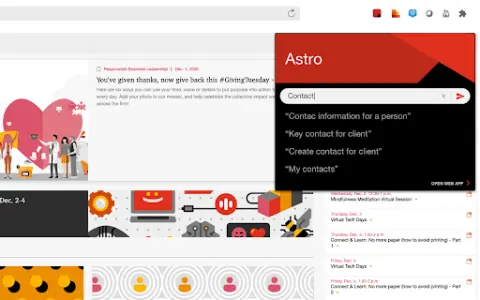
Astro is an artificial intelligence assistant designed to integrate with a company's existing systems to improve work efficiency and help users manage their daily affairs. Users can interact with it via voice or text to perform a variety of tasks such as managing schedules, tracking time, viewing benefits, tracking goals, and gaining customer insights.
How to use Astro ai chrome extension/plugin?
Interact with Astro from your phone or computer and make requests using text, voice or touch. For example, ask, 'When is my next meeting with Isa Morales? ’ or ‘What’s my holiday balance? ’
Core features of Astro ai chrome extension/plugin
Voice and text interaction
Integration with company systems
task management
time tracking
Benefits view
target tracking
customer insights
Integration with company systems
task management
time tracking
Benefits view
target tracking
customer insights
Related
International Music Score Library
It boasts the world’s largest collection of free public copyrighted musical resources, including sheet music and recordings. The website is available in multiple languages, including Chinese, but users should be aware of the copyright laws in their own countries when using it. All content can be downloaded for free~~ To date, 214,386 works by 26,190 composers have been included in this collection.
Paper Download Center
Using the search function redirects you to a paid page, so this site has taken it down! Only the introductory article is kept. The website is called: Free Paper Download Center. It doesn’t look like a high-quality site, but it’s really convenient and easy to use! The site requires no login and has no restrictions; all documents are completely free.
Lenovo Widgets
Lenovo Quick Fix consists of hundreds of intelligent tools provided by Lenovo’s official knowledge base, designed to help solve various minor problems that may occur on Windows computers. These are independent and practical tools developed by Lenovo specifically for use on Windows systems – for example, they allow you to disable the automatic update feature in Windows 10.
Watermelon Creative Research Center
With the explosive growth of short videos in recent years, anyone can become an excellent self-media creator. Whether it’s a hobby or a side business to engage in during your free time, self-media is definitely a great option. If you’re considering creating short videos but don’t know where to start, I recommend that you first take advantage of the free training programs offered by Xigua Video.
China News Cloud Media
China News Cloud Media: This is a website that aggregates content from various Chinese news media sources, including newspapers and live television broadcasts from the central government, provincial-level authorities, and 333 prefecture-level cities across the country. The development of cloud media has significantly lowered the barriers to accessing news; all one needs to do is open the relevant websites using a browser on a mobile phone, computer, or iPad to view the content.
Snipaste
Snipaste is a simple yet powerful screenshot tool that also supports the ability to paste images directly onto the screen. This makes it much more convenient for you to view the captured images, thereby significantly improving your work efficiency. Download and open Snipaste, press F1 to start taking a screenshot, and then press F3 to save it.