AI TOOL / #05985
Voiceboost – ChatGPT
A Chrome extension designed for voice-controlled interaction with ChatGPT.
Introduction
Chrome extension for voice-controlled ChatGPT interaction.
What is the Voiceboost AI Chrome extension/plug-in?
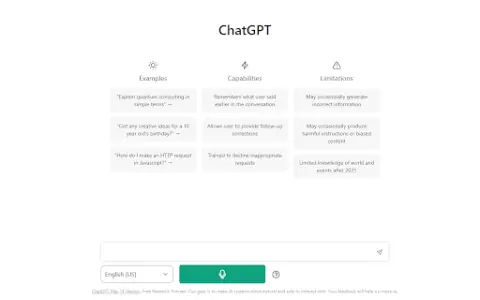
Voiceboost is a Chrome extension that allows users to interact with ChatGPT via voice commands. It adds a button below the input field; by clicking this button, the system captures the user’s verbal inquiries and sends them to ChatGPT for responses. This provides a hands-free alternative for entering text.
How to use the Voiceboost AI Chrome extension/plug-in?
Click the button added below the input area to start recording your voice input. Alternatively, use the keyboard shortcuts: Ctrl+Shift+S (Windows) or Command+Shift+S (Mac) to begin recording, and Ctrl+Shift+E (Windows) or Command+Shift+E (Mac) to stop and submit the recording. Make sure to grant microphone access when prompted.
The core functionality of the Voiceboost AI Chrome extension/plugin
Voice input for ChatGPT
Keyboard shortcuts for voice capture and submission
Keyboard shortcuts for voice capture and submission
Related
ChattyUI
An open-source model with an interface similar to Gemini/ChatGPT, designed for use in local browsers.
Broken Bear
A comforting AI chatbot that loves your broken self.
ChatGPT Dansk
A free Danish-speaking chatbot that uses artificial intelligence to understand and respond in human language.
VersaBot
Versabot utilizes AI-powered robots to automate various aspects of marketing efforts, content creation, and customer service across all channels.
Mottle Bot
Mottle is a code-free platform that allows users to create custom AI chatbots using text files.
LMGTFY + GPT = LetMeGPT
LetMeGPT combines the functionality of LMGTFY with that of GPT, enabling it to easily answer questions that can be found online.