AI TOOL / #06759
Chromesthesia
Capture audio tagged with relevant labels and use various audio recognition services to analyze them.
Introduction
Captures tab audio and identifies it using various audio recognition services.
What are Audio Recognition Services, and what are the Chrome extensions/plugs related to AI?
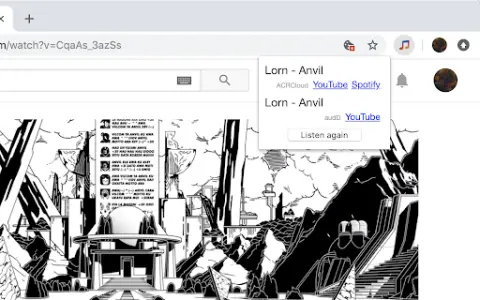
This service captures the audio being played within browser tabs and sends it to audio recognition services. Currently supported services include audD (no account required; 10 free requests per day), ACRCloud (account needed, but a free plan is available), and AudioTag (account needed, but a free plan is available).
How to use the Audio Recognition Services Chrome extension?
This service captures the audio being played within browser tabs and automatically sends it to the configured audio recognition services (such as audD, ACRCloud, or AudioTag). The identified song information is then returned.
The core functionality of the Audio Recognition Services AI Chrome extension/plug-in
Capture audio from a browser tab
Integration with various audio recognition services (audD, ACRCloud, AudioTag)
Integration with various audio recognition services (audD, ACRCloud, AudioTag)
Related
New Beacn
Identifying B2B Buying Signals and Generating Sales Actions
The new Tomo for ChatGPT
In ChatGPT, knowledge is transformed into fun mini-games designed to help users progress through various levels.
GenOffice
Free and open-source AI office suite
Audio Lip-Sync Pro
A locally-installed Blender plugin for generating voice lip-sync animations
Backdrop Agent
Build your own team of AI colleagues based on your business needs.
Audimate
Arro, the desktop AI assistant that follows the cursor to help you work