AI TOOL / #07146
ImageToText
An extension that copies text from images on the internet via the OCR.Space API.
Introduction
An extension to copy text from images on the internet using OCR.Space API.
What is the OCR.Space API AI Chrome extension/plugin?
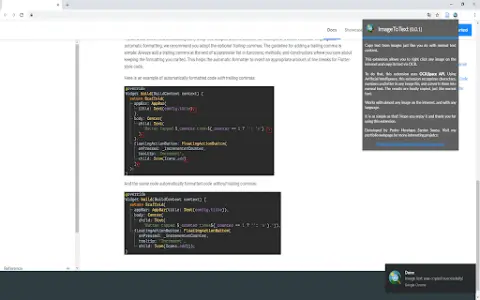
This extension lets you copy text from any image on the internet just like regular text content. Simple—that's the goal of this app. Just right-click the image, select “Copy Image Text,” and you're done… You can use and paste the text you see in that image. It's very useful for extracting text from informative, entertaining, and code-block images. Now you don't have to rewrite everything—with this extension, the problem is solved. To process images, this extension uses the OCR.Space API.
How do I use the OCR.Space API AI Chrome extension/plugin?
Right-click an image, select "Copy Image Text," and then paste the extracted text.
Core features of the OCR.Space API AI Chrome extension/plugin
Copy text from images on the internet.
Related
JobHunnt
An artificial intelligence-based job application assistant that helps users create personalized resumes and cover letters.
MacGPT
A Mac application designed for accessing ChatGPT, featuring global search functionality, integrated tools, and a menu bar interface.
Alfred AI
Alfred AI's automated API workflow of Treblle enables the generation of integrated solutions and significantly enhances the speed of these APIs.
Sloneek
Sloneek is a modern human resources software designed specifically for growing teams.
khanmigo.ai
The AI personal mentors and teaching assistants launched by Khan Academy are designed to facilitate personalized learning and efficient teaching.
MaxAI.me
An AI extension that can be used with just one click, enabling users to write, edit, summarize, and translate text online.