AI TOOL / #09053
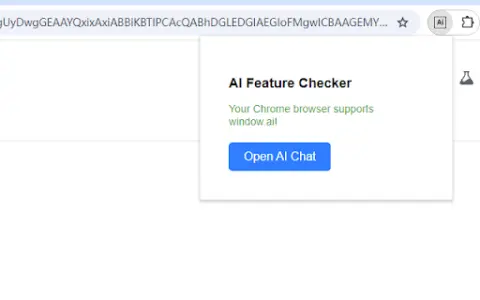
AI Feature Checker
A Chrome extension designed to check and enable AI functions within the browser.
Introduction
Chrome extension to check and enable AI features in your browser.
What is the AI Feature Checker Chrome extension/plug-in?
The AI Feature Checker is a Chrome browser extension designed to help users determine whether their browser supports the `window.ai` object. It enables users to quickly verify whether their browser has AI capabilities, and provides step-by-step instructions for enabling or configuring such features if they are not available. The extension also offers multilingual support and provides direct access to relevant Chrome logos and download pages.
How to use the AI Feature Checker Chrome extension/plug-in?
Install this extension from the Chrome Web Store. The extension will automatically check whether `window.ai` is supported. If it is not, follow the provided instructions and links to enable the necessary Chrome flags.
The core functionality of the AI Feature Checker extension/plug-in for Chrome.
Check whether `window.ai` is supported in Chrome.
Provide guidance on how to enable AI features.
Provides multi-language support (English, Chinese, Spanish, etc.)
It includes a useful Chrome logo as well as a link to the download page.
Provide guidance on how to enable AI features.
Provides multi-language support (English, Chinese, Spanish, etc.)
It includes a useful Chrome logo as well as a link to the download page.
Related
PixEditor AI
An online AI image editor that allows users to modify images with just one sentence.
Dimly AI
Automatically convert songs into AI-generated music videos
Relax-Game-Toolkit
A collection of pure-front-end, dependency-free mini-games – a single HTML file contains approximately 20 games and relaxation tools, such as the electronic wooden fish game, 2048, Snake, Minesweeper, and more. After downloading the index.html file (about 315KB), double-click it to play in any browser. These games are compatible with mobile touchscreens and support local storage of game saves.
Stiro
An AI specialist who helps users complete all the configuration tasks within SaaS platforms.
Azahar
The open-source 3DS emulator project is the result of the merger and continuation of the Citra branch and the Lime3DS project. It is currently recommended to download and use it on the Android platform via Google Play.
Redream
The Dreamcast emulator is known for its simplicity, ease of use, and high compatibility. It supports platforms such as Windows, macOS, Linux, and Android, and is capable of running a vast number of classic DC games.